NOTE: THIS SPREADSHEET IS OUTDATED. FOR THE MOST RECENT SPREADSHEET, CLICK HERE!
It’s the start of the new year and, of course, that means the updated writing progress spreadsheet. For those of you who are new to using it, find the description and instructions below. For those of you who are spreadsheet veterans, skip right to the bottom to find out how to get your copy for this year!
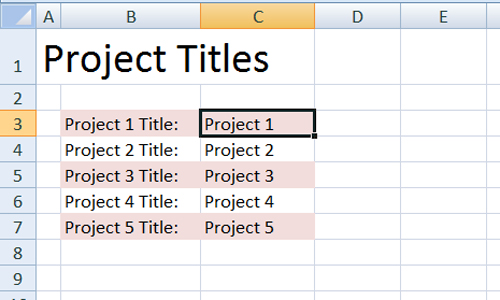
The first thing you’ll notice (for 2007 users) is that there are multiple worksheets. The spreadsheet will open to the first worksheet, pictured below, where you will name your projects. Simply highlight the cell where it says “Project 1”, “Project 2”, etc. and replace it with the names of your projects. It will change the titles throughout the entire workbook. I recommend keeping them fairly short–one to two words or an acronym–otherwise they’ll run over on each other.
Along the bottom are your worksheets. There is one for the titles, one for each month of the year and a yearly totals sheet. Choose the month you’d like to go to and you’ll find a worksheet that looks like the one below. On the left, it’s laid out like a calendar, on the right, by day and at the bottom, a graph of your progress.
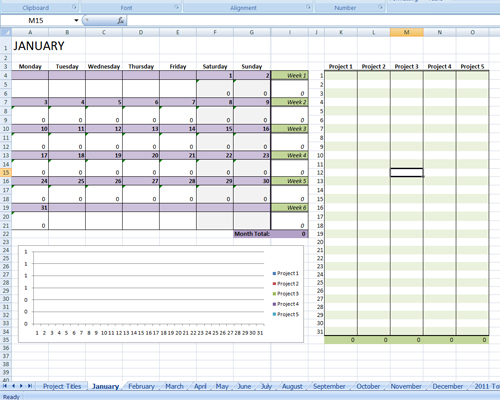
You will ONLY make changes to the daily section of the spreadsheet. All other areas have functions to automatically add up totals for you. So, for instance, you’ll go to the third day of January and enter the word count for Project 1 (or whatever you’ve renamed it). It adds your word count for today to the total Project word count for the month at the bottom of that column, it also appears in the calendar, which calculates your word count for all projects each day and then gives you a total sum at the end of each week and a total sum for the month at the bottom of the calendar. Note that on the weekly totals, it’s calculated for 7 days so the first week might look a little high, but it’s actually pulling the totals for the last days in the previous month. Also note that any added on projects will not automatically calculate in without additional adjustment to the code.
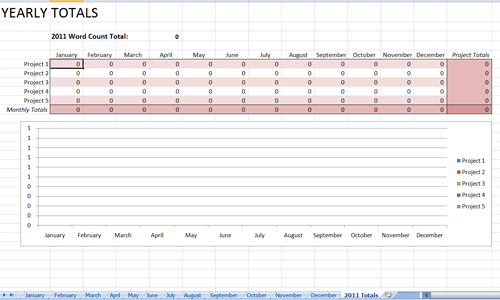
Lastly, your final sheet will add up totals for the entire year by project, by month and also a grand total for the entire year.
The cells containing functions are locked to avoid accidentally deleting the function but if you need to make changes, there is no password so just hit enter when it prompts you for one and you should be allowed to make the changes after that. If you come across any bugs, let me know and I’ll do my best to fix them.
I hope this spreadsheet helps you keep track of your writing goals and I hope you fill each and every cell with writerly love.
Get Your Copy!
NOTE: THIS SPREADSHEET IS OUTDATED. FOR THE MOST RECENT SPREADSHEET, CLICK HERE!


This looks complicated … but I think I’ll give it a try.
Haha! You know me. It was complicated to make but it should be fairly easy to use (I hope!). Let me know what you think!
Now that I’ve started playing with it, it’s not as difficult as it looks. Thanks. 😉
Awesome! You’re welcome!
I’ll try it. 🙂 Thanks!
You’re very welcome! I want progress reports. 😉
Oooooo how pretty! I love what you did with it this year. Hmmmmm wonder how I can apply it to blogging…
It’d be easy enough to write your blogging word count in there. Or just a “1” for every day you blog. You could keep track of how many blogs you post in a year that way.
That would be pretty cool. Now to just figure out how to work excel. 😛
You’ve saved me a lot of work trying to design my own. I love these types of things, thank you so much!
You’re welcome! I love these types of things too. I’m organized to a fault. 😉 Not the worst trait for a writer, right?
This is incredible. I can’t wait to start using this!
Thank you! Enjoy!
Thanks for sharing Jamie. I do love spreadsheets. And I do like to keep track of my production. Have a great day!
I told you I was a spreadsheet-aholic! Lol!
Love this Jamie! I can’t wait to get my projects up and running on here. One question: how do I add more projects? I love the idea of keeping track of blogging on here too and I have lots of projects that are in the finishing stages of editing, so I need some room for the new ones. I’m an excel illiterate, but I’m trying to learn!
I’m so glad you like it! Unfortunately, adding more projects would mean recoding the entire spreadsheet. 🙁
Just start a new spreadsheet and label it differently. Then you can have all new projects on that one! That’s what I did last year when I ran out of room. 🙂
Love this years spread sheet and I’m so excited to get started in January !
Nice! Good idea!
This looks wonderful! I’m just about to tackle several projects that have minimum word counts so this will be very helpful. Thank you so much for sharing with us!
You’re very welcome! 🙂
This is a BEAUTIFUL thing! Thank you, Ms. Raintree. It’s fantastic.
You’re welcome! Glad you found it useful. 🙂
Hi Jamie. I found your site and this excellent spreadsheet tool via Google. I’ve been looking for something exactly like this to start seriously tracking word counts on some short stories, a novel, and even some blog posting.
May I have your permission to link to the blog post/article offering the spreadsheet on my home site? I would plan on doing a blog post there telling my readers generally about your site and your work, and specifically about the spreadsheet with a specific link to the spreadsheet.
Gary
I’m so glad you’re finding it useful, Gary. You can absolutely link to it. And I usually update it every year so come back if you need one for next year. 🙂
Hi. The daily activity you’ve committed to your Writing Progess Spreadsheet could be more efficiently tracked with an Excel pivot table, which would obviate the need for separate monthly tabs. You can email me about this if you wish.
Thanks,
Abbott Katz
Jamie, I’ve used this daily in 2012, but 2013 is getting close. Will you have an update soon!?
Yikes! I better get on that. Thanks for the reminder. Yes, I will get that up soon.
I love using your spreadsheet. Thanks so much for updating it and sharing it again.
You’re welcome! Thanks for giving me the idea!
This is just what I need! An excellent New Year present. Thank you!
You’re very welcome! I hope you have a great year!
Awesome Jamie! Thank you. It’s just what I need to see my progress.
Welcome!
Thanks Jamie! Melissa McClone recommended this to me. It looks excellent. I’ll be sure to recommend it to my followers as well.
Barb
Thanks, Barb! I hope you get a lot of good use out of it!
This. Is. So. Cool! Just what I needed and really easy to use! Thanks for sharing it with everyone.
You’re welcome! I’m glad you’re finding it useful!
I’ve tried to create a spreadsheet to keep up with my writing projects without much success. This is great. Thanks for sharing, Jamie.
My pleasure. 🙂
I love this spreadsheet. I just linked to it because EVERYONE should know about this. I’m using the five-title tracking to help me write a series!
Awesome! Glad you like it! I’ll be posting one for 2014 in December.
Hey Jamie, this looks like a great system! I’d love to try this out for 2014. Any suggestions on how I can update it without breaking the code would be appreciated.
Thanks for offering such an awesome tool for free!
Happy holidays.
Hey Lauren! Glad you like it! I’ll be updating it for 2014 and posting it here. Check back in a few weeks!
This is brilliant. Please update it for 2014! I love it and if you update it I will love you. Thanks so much.
Well, who could deny that? 😉 Updating it this week! Look for it here next week!
This is wonderful, Jamie! 😀 Thank you.
You’re welcome!
You’re so welcome!
I submitted my request and shared this post with two picture book/children’s writers groups. Thanks for sharing.
Thank you so much! I got your email and will send it over shortly. 🙂
Do you have a version for Excel 2010 or one that will work? I would love to use it. I have several wips I would like to keep track of and it is hard. lol I write a little bit of everything from children’s, paranormal, and erotica. kbinmich AT yahoo DOT com
That is great question! I got your email so I’ll send it over to you. I would love it if you could message me back and let me know how it works. Look for it shortly!
You got it. I will try working with it this weekend to see how it functions! I will email you back with my “review” of it. lol
Perfect! Thanks!
As far as I can tell, it works great with Office 2010! I just peeked around a bit, until I can organize my documents to get them all typed into the spreadsheet, but it seems to function as intended! Thank you!
Glad to hear it! You’re welcome!
Thanks for posting this will have to give it a try.
Great! I’ll look for your email!
Spreadsheets! I love spreadsheets!
Lol! You and me both. 🙂
I’ve been trying to do something like this and have failed. Would love to try it for 2014.
I’ll look for your email!
Hey Jamie, I’d love to get a copy of your spreadsheet.
I have your email! It’s heading your way!
This is awesome! Thanks for sharing. I’ve sent my email in. Cheers!
Got it! Look for it shortly!
Wow! This is amazing. I am emailing you for the worksheets and thanks!!! You rock 🙂
I got your email! I’ll get that to you by the end of the day. 🙂
Perfect! I’ve already set it up for January. My current book which needs much rewriting and revising is listed as Project 1; my 2 sequels are also listed as Project 2 and 3. I’ve got an idea for a short story – Project 4. Wow. Do-able!! Thanks so much for this, Jamie.
You’re so welcome! Thank you for sharing how you’re using it! I’m just glad there are people out there who love stats as much as I do. Lol!
Girl, you are the new excel queen. I remember a holiday when my girlfriend and I met in Williamsburg and sat in the hotel room sharing our spreadsheets. Sad, huh? This is a beautiful, awesomely practical spreadsheet. Thanks for making it available.
Lol! Thanks, Martie! I promise you, I’m not. Just determined! Glad you like it!
I’d love to get a copy of this spreadsheet too! I think I have the newest version of excel (2010?) so I would need the .xlsx.
Thanks! Can’t wait to start it up!
Hi, Debora! Absolutely! Just send me an to address listed above so I can attach it for you. Thanks!
deboradennis@gmail.com
Thanks!
Jamie – thanks so much for sharing this again. I used your 2013 spreadsheet and LOVED it, and I was about to start adapting it for this year (a massive task, as you know) so I’m thrilled you’ve chosen to share your skills again. I’ll definitely be emailing!
I’m glad to hear it worked well for you! I’ll be updating it every year for the foreseeable future. 🙂
This looks like what I have been searching for!!
Awesome! I got that out to you. Enjoy!
I submitted my request and shared this post with two picture book/children’s writers groups. Thanks for sharing. Janice
Awesome! Thank you for sharing! I hope you enjoy it!
Can I still have a copy? Thanks!
[…] of your daily writing progress. Women's fiction author Jamie Raintree has designed a lovely Excel spreadsheet that can help you keep track of your daily word count. It's free when you subscribe to her email […]